
Table of Contents
- 1. What Is the Best Way to Print Labels at Home?
- 2. Is It Cheaper to Print Your Own Labels or Buy Them?
- 3. Does UPS Still Give Free Labels?
- 4. How Can I Print My Own Labels for Free?
- 5. Can a Regular Printer Print Sticker Labels?
- 6. Can I Print Labels on a Normal Printer?
- 7. Is There a Label Template in Word?
- 8. Can You Print Labels on a Home Printer?
- 9. When to Graduate from DIY to Factory-Direct Labels
Whether you are a small e-commerce seller fulfilling weekend orders, a home organizer, or a startup brand testing packaging concepts, learning the best way to print labels at home can save you both time and money. However, what most online tutorials fail to mention is that 80% of “label printing failures” are caused not by the printer—but by the wrong material choice.
As manufacturers of industrial-grade pressure-sensitive labelstock at Jumelage, we have spent decades engineering materials that survive cold chains, chemical exposure, and high-speed applicators. In this guide, we apply that factory-floor expertise to help you master home printing, while explaining when it is time to graduate from DIY to factory-direct rolls.
This article is for general information, not medical advice. For wound closure, infection risk, and injury care, follow local clinical guidance or consult a qualified clinician.
What Is the Best Way to Print Labels at Home?
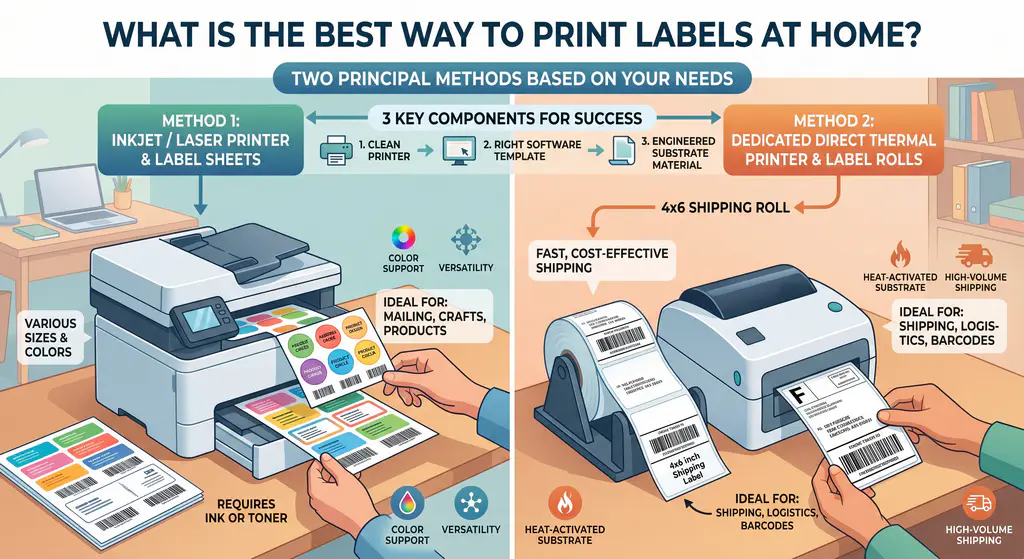
The best way to print labels at home is to pair a reliable inkjet or laser printer with pre-cut self-adhesive label sheets sized for your specific printer model. For thermal-style shipping labels, a dedicated direct thermal printer (like the Rollo or Munbyn) is the most cost-effective option, as it eliminates the need for ink or toner.
For most home users, the workflow comes down to three components: a clean printer, the right software template, and—critically—a substrate engineered for residential printing. To understand why material choice matters more than equipment, see our foundational guide on What Does Self-Adhesive Mean?.
Is It Cheaper to Print Your Own Labels or Buy Them?
For volumes under 500 labels per month, printing your own labels at home is significantly cheaper—typically 0.03–0.03–0.08 per label versus 0.15–0.15–0.30 for pre-printed labels. However, once you exceed 1,000 units monthly, the cost flips: factory-printed labels become more economical due to ink costs, printer wear, and labor time.
The math gets more nuanced when durability enters the equation. A home-printed inkjet label will smudge in humidity, while a factory-coated thermal label survives global logistics. This is why we often advise startup brands to begin DIY for prototyping, then scale to a self-adhesive packaging materials supplier once their volume justifies it.
Does UPS Still Give Free Labels?
Yes, UPS still provides free shipping labels through their official shipping portal. After creating an account, you can print labels at home using a standard A4 or letter-sized printer. UPS, USPS, and FedEx all offer free downloadable PDF labels for paid shipments.
However, the “free” label only refers to the digital file—you still need quality label paper to print on. Using cheap paper for shipping labels often leads to scanner failures at the carrier sorting facility, which is the leading cause of lost packages in B2B e-commerce fulfillment.
How Can I Print My Own Labels for Free?
To print your own labels for free, use Avery Design & Print Online, Canva’s free label templates, or Microsoft Word’s built-in label wizard. All three tools offer thousands of free templates calibrated to standard label sheet sizes. You only need to pay for the blank label paper and ink/toner.
For best results, always download the template that matches your exact label sheet brand and product code (e.g., Avery 5160). Mismatched templates are the #1 cause of misaligned printing. We discuss material compatibility in greater depth in our Self-Adhesive vs. Adhesive comparison guide.
Can a Regular Printer Print Sticker Labels?
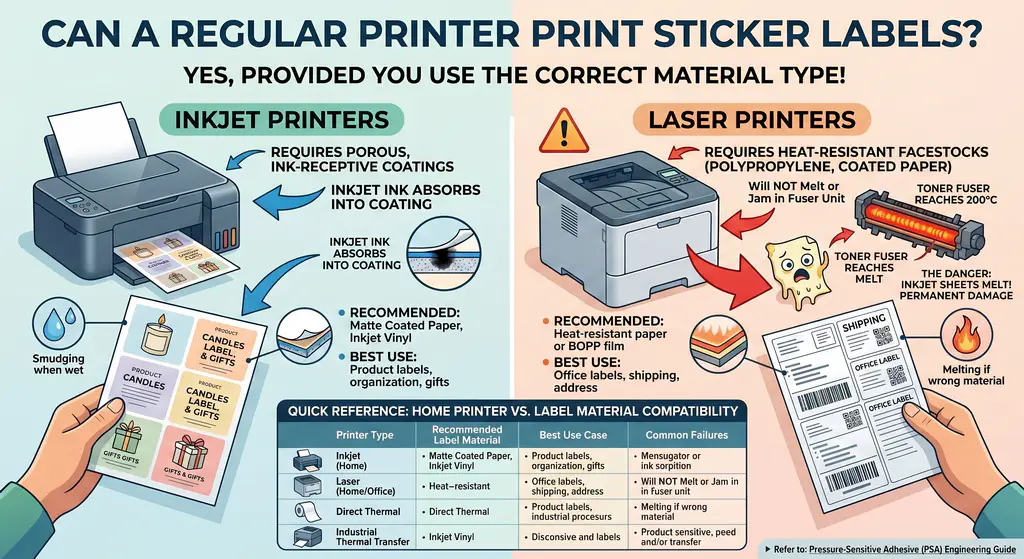
Yes, a regular inkjet or laser printer can print sticker labels, provided you use the correct material type. Inkjet printers require porous, ink-receptive coatings on the label sheet, while laser printers require heat-resistant facestocks (typically polypropylene or coated paper) that won’t melt or jam in the fuser unit.
Using inkjet-specific sheets in a laser printer is one of the most common—and dangerous—home printing mistakes. The toner fuser can reach 200°C, melting incompatible adhesives and causing permanent damage. To learn about industrial-grade chemical compatibility, refer to our Pressure-Sensitive Adhesive (PSA) Engineering Guide.
Quick Reference: Home Printer vs. Label Material Compatibility
The table below clarifies the best way to print labels at home based on your existing equipment.
| Printer Type | Recommended Label Material | Best Use Case | Common Failures |
|---|---|---|---|
| Inkjet (Home) | Matte coated paper, inkjet-compatible vinyl | Product labels, organization, gifts | Smudging when wet, slow drying |
| Laser (Home/Office) | Heat-resistant paper or BOPP film | Office labels, shipping, address | Melting if wrong material; jams |
| Direct Thermal (Rollo/Munbyn) | Thermal labels (4×6") | Shipping labels (UPS/USPS/FedEx) | Fading in heat/UV; receipt-grade only |
| Industrial Thermal Transfer | Synthetic facestock + ribbon | Pharma, cold chain, asset tags | N/A — factory-grade durability |
Can I Print Labels on a Normal Printer?
Yes, you can print labels on a normal home printer as long as the label sheets are rated for that printer type. Most inkjet and laser home printers accept standard A4 (8.27″ × 11.69″) or letter (8.5″ × 11″) label sheets. Always verify the manufacturer’s media weight specs before printing.
Look for sheets between 60–90 GSM (grams per square meter) for inkjet and 70–90 GSM for laser. Heavier stocks may jam the paper feed mechanism. For BPA-free thermal applications such as receipts and shipping labels, you must use a dedicated thermal printer—standard printers cannot activate thermal paper.
Is There a Label Template in Word?
Yes, Microsoft Word has built-in label templates. Navigate to Mailings → Labels → Options, then select your label vendor (Avery, Herma, etc.) and product code. Word will auto-populate a properly formatted document. You can also download additional templates for free from the Microsoft Office template library.
For more flexible designs, Canva and Avery Design & Print offer drag-and-drop interfaces with thousands of customizable templates. These are particularly useful when designing branded product labels that need to match your packaging aesthetic.
Can You Print Labels on a Home Printer?
Absolutely. Home printers can print high-quality labels when paired with the correct label sheets and software template. The keys to success are: (1) clean print heads or fuser rollers, (2) properly aligned templates, (3) printer-compatible adhesive sheets, and (4) printing one test sheet before batch printing.
If you find yourself printing more than 1,000 labels per month, the cost-benefit shifts dramatically toward factory-printed labels. Industrial converters use the same engineered substrates we discuss in our Cold Chain & Medical Self-Adhesive Materials Guide, but at a fraction of the per-unit cost.
What Is the Best Program to Print Labels?
The best program to print labels depends on your use case. For shipping, use the carrier’s native software (UPS WorldShip, USPS Click-N-Ship). For product labels, Canva and Avery Design & Print lead the consumer market. For inventory and barcoding, dedicated software like BarTender or NiceLabel offers professional-grade output.
Free tools handle 90% of home label printing needs. However, if you are designing labels that will eventually be mass-produced by a manufacturer, request the artwork specifications from your supplier first—improperly sized digital files are the #1 cause of production delays in B2B label converting.
When to Graduate from DIY to Factory-Direct Labels
The honest answer most blogs won’t tell you: the best way to print labels at home is also the most temporary. Home printing is ideal for:
- Prototyping: Testing 5-10 design iterations before committing to a print run.
- Low-volume sales: Under 500 units per month.
- Internal use: File folders, asset tags, organization.
The signals that you have outgrown DIY include:
- Spending more than 2 hours per week printing labels.
- Customer complaints about smudging, fading, or peeling.
- Needing labels that survive freezing, sunlight, or chemical exposure.
When you hit any of these thresholds, the International Organization for Standardization (ISO) recommends transitioning to professionally manufactured labelstock that meets ISO 29862:2018 testing standards. At Jumelage’s 35,000㎡ GMP-certified facility, we manufacture jumbo rolls that converters worldwide use to produce the very labels home users wish they could replicate.
Next steps (for teams evaluating adhesive materials)
If you’re evaluating adhesive-backed materials for demanding packaging or labeling applications, the same mindset applies: define the substrate, the environment, and the failure mode you can’t accept.
You can review Why Jumelage for a snapshot of quality systems, explore Self-Adhesive vs. Adhesive: 5 Crucial B2B Differences for materials terminology, and reference Choosing GMP Certified Adhesive Materials for Medical and Pharmaceutical Labels for a compliance-first view of adhesive-backed materials.
And if your goal is device securement under heat, moisture, or friction, treat it like a controlled test: skin prep, the right backing, the right adhesive chemistry, and clear removal instructions.
Right Tool for the Right Job
The best way to print labels at home in 2026 comes down to matching your printer, software, and material to your actual use case. For occasional household projects, a regular inkjet plus Avery sheets is more than sufficient. For growing brands, the smart move is to prototype at home, then transition to a factory-direct supplier as volume scales.
For an overview of how engineered self-adhesive materials integrate with global supply chains—and how to source them responsibly using FSC-certified liners—visit our master Self-Adhesive Packaging Materials Guide and our full Technical Blog Library.
